
HOW TO GET AND USE A FREE KDP ISBN?

For anyone publishing a print book on KDP, the platform offers an ISBN for free, but there’s a catch: an ISBN assigned by KDP can only be used on KDP.
You can buy your own ISBN from your country’s ISBN agency and use it on the book published on KDP. But the other way around, using the KDP ISBN to publish on other platforms, no.
When the free KDP ISBN is worth it
If your print book will only be sold through Amazon, the free KDP ISBN is a good way to save money. The imprint will show as “Independently published”. If you plan to sell the same edition through other channels, such as IngramSpark, Lulu or bookstores, use your own ISBN.
| free KDP ISBN | Your own ISBN | |
|---|---|---|
| Cost | Free | Paid (free in some countries, such as Canada) |
| Where it can be used | Only on KDP | On any platform, including KDP |
| Imprint | Independently published | Your name, brand or publishing house |
If you intend to sell the same print book on other platforms (IngramSpark, Lulu, bookstores), use your own ISBN from the start.
How to get the free KDP ISBN
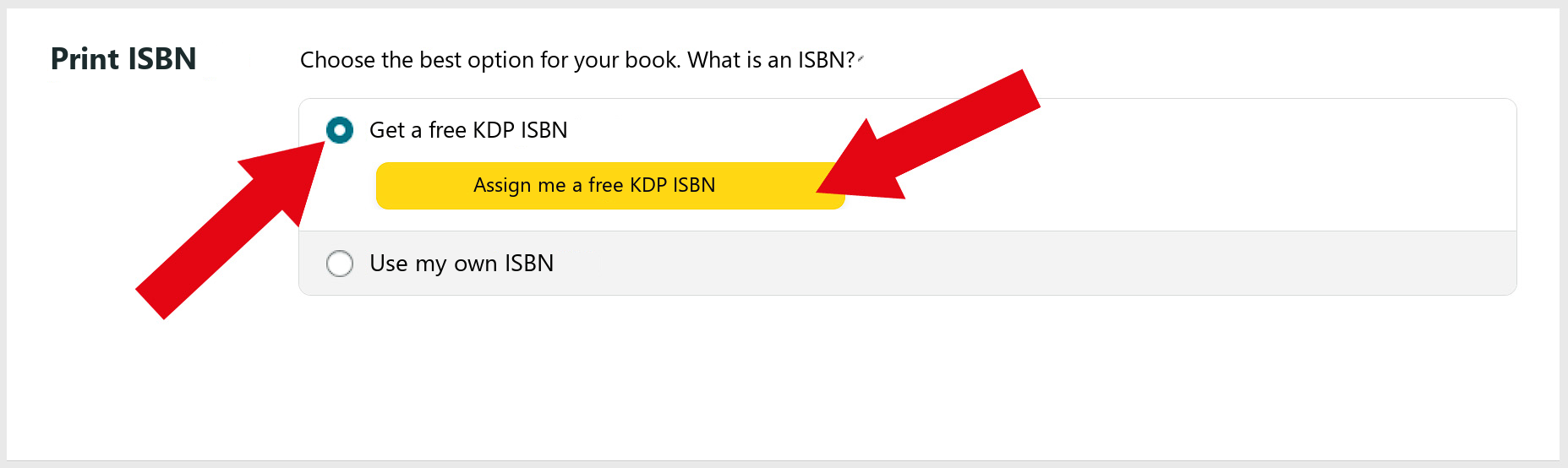
Go through the setup of the print book on KDP. In the second step, Content, the ISBN section shows the options.

- Choose Get a free KDP ISBN.
- Click Assign me a free KDP ISBN.
- Read the notice that the ISBN can only be used for books published on Amazon through KDP and click Assign ISBN.

Done! You’ve been assigned a free KDP ISBN. Copy the number and add it to the interior of the book, on the copyright page.

How to use your own ISBN on KDP
If you bought your ISBN from your country’s agency, select the second option, Add your own ISBN, and enter the number and the imprint exactly as registered with the agency. If a publisher or service registered it for you, use their name. If you registered it yourself and have a brand or company, use its name. Don’t enter the company you bought the ISBN from (such as Bowker) as the publisher.

Where to buy your own ISBN: in the United States, from Bowker; in the United Kingdom and Ireland, from Nielsen; in Canada, for free, from Library and Archives Canada; in Australia, from Thorpe-Bowker. In other countries, look up your national agency on the International ISBN Agency website.
Frequently asked questions
Does an eBook need an ISBN on KDP?
No. KDP generates an ASIN for the eBook, and the ISBN is optional.
Can I use the KDP ISBN on IngramSpark or Lulu?
No. The free KDP ISBN is only valid for the book published on KDP.
Can I change the ISBN after the book is published?
Not on the same book. To change the ISBN you need to create a new edition.
Tools and resources
Any questions about ISBNs on KDP? Leave them in the comments.