

HOW TO CANCEL YOUR KDP SELECT ENROLLMENT?
Once your book is enrolled in KDP Select, you may wonder how to cancel, because there is no direct “cancel KDP Select” button.
So I’ll show you, step by step, how to end your enrollment and what happens to your eBook afterwards. If you haven’t published yet, start with how to publish an eBook on Amazon.
How to cancel your KDP Select enrollment
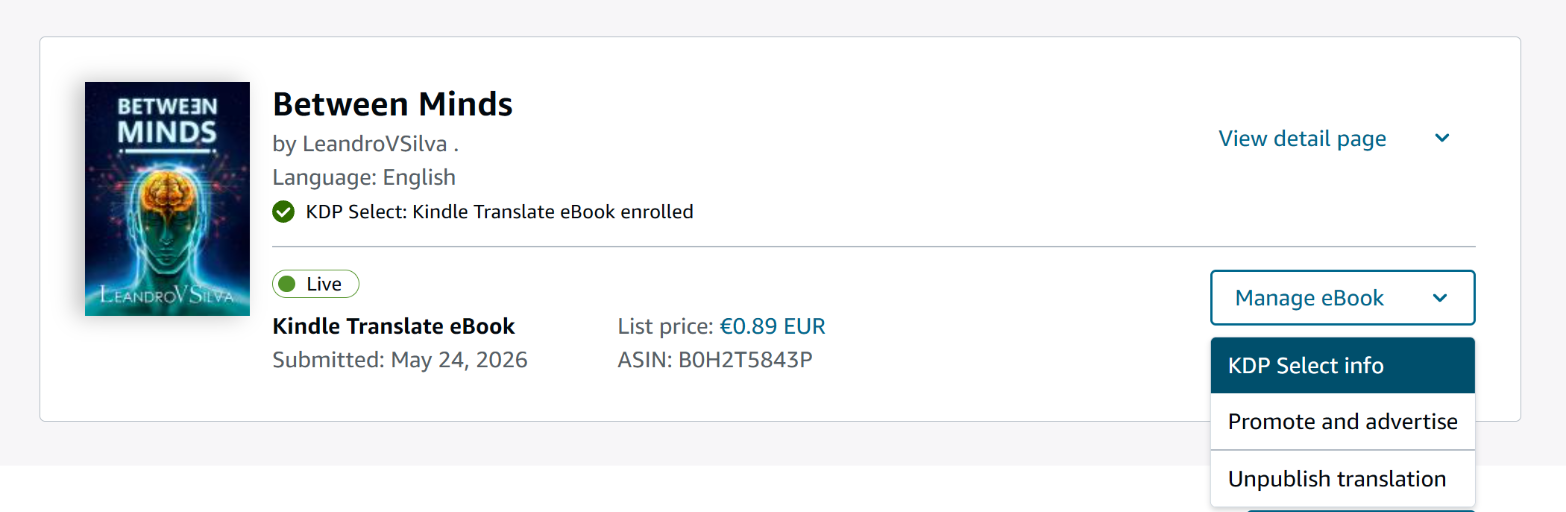
- Sign in to KDP and go to your Bookshelf.
- In the eBook’s menu, click KDP Select info (on the Promote and advertise page, the same option is called Manage enrollment).
- In the Manage KDP Select enrollment window, check the current term, with its start and end dates.
- Select Turn off automatic renewal and click Save changes.
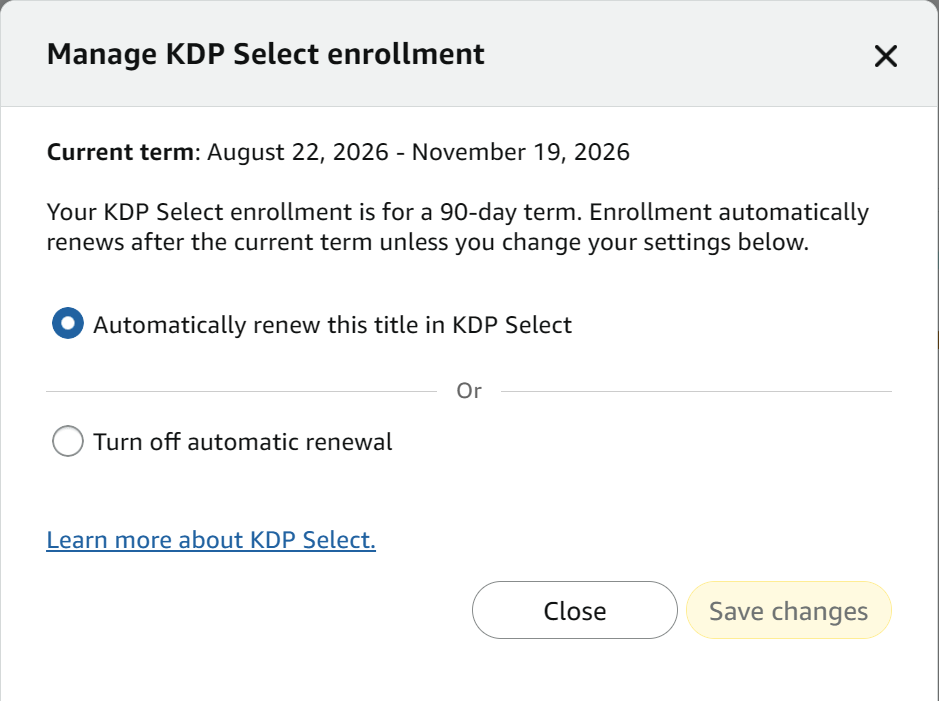
Done! Your enrollment will not renew.
Even with automatic renewal turned off, the eBook stays in KDP Select until the end of the current term shown in the window. Only after that date does it leave the program.
What changes after you leave KDP Select
- Royalties in Brazil, Japan, Mexico and India: in these stores the 70% royalty only applies with KDP Select; outside it, sales there pay 35%.
- Kindle+ (formerly Kindle Unlimited): the eBook leaves the subscription catalog, and you no longer earn for pages read.
- Select promotions: no more free promotions or Kindle Countdown Deals.
- Freedom: you can distribute the eBook in other stores (Kobo, Google Play, Apple Books) or however you like.
Understand the difference between the programs in how to get your books into Amazon Prime Reading and see the promotions you give up in how to run a free eBook promotion.
Frequently asked questions
Is there a button to cancel KDP Select?
No. You turn off automatic renewal, and the eBook leaves the program at the end of the 90-day term.
Can I leave before the 90 days?
Not from your dashboard. In specific cases KDP support may review a request, but the standard is to wait until the term ends.
How much will I earn outside KDP Select?
In most Amazon stores the 70% option doesn’t depend on KDP Select (it depends on the store and the price range). In Brazil, Japan, Mexico and India, sales drop to 35%.
Tools and resources
Any questions about KDP Select? Leave them in the comments.